Last year I finally audited my CRM. Found 14 years of dead data sitting in there.
Except "14 years" is a lie. I haven't been doing marketing for 14 years. What I actually had was imported data dragged forward from spreadsheets, contact exports, a long-gone MLM contact list, an old engineering job's address book, and business cards I'd been typing in since I was 22. Birthdays, spouse names, notes from a Christmas party in 2014.
Some of these people are dead. Some of them I would not recognize on the street. One of them is in prison.
I'd been paying to store all of it. Every month, for years. And every report I pulled was lying to me because of it.
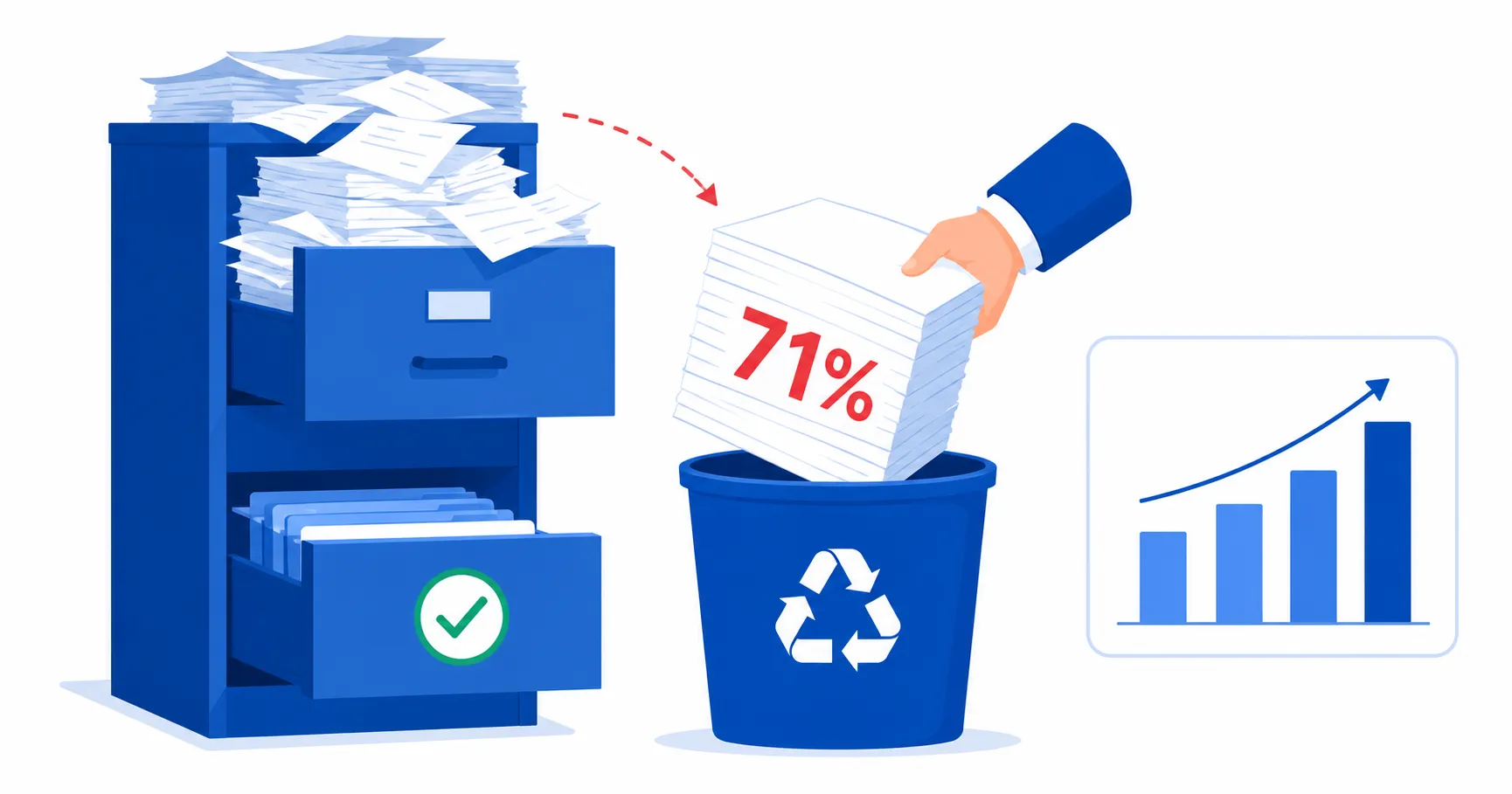
So one Saturday I sat down and deleted about 71% of my contacts. The next month, reply rates went up. Deliverability went up. Reporting started telling the truth. And the weird emotional part nobody talks about - I felt lighter. Like I'd cleaned out a garage.
Why we hoard data
The CRM industry sells software priced per contact. More data is not better. Past a point it's actively worse.
Join the Seedly owners community.
Owners trade setups, share add-ons, and swap playbooks. See what people are building before you commit.
I see the same pattern in every agency client audit I do. 40,000 contacts. Haven't emailed 38,000 of them in over two years. Paying per seat, per contact, per record, per send. The CRM is a junk drawer with a monthly fee.
The anxiety is real. "What if I need it." Same logic as your grandmother hoarding margarine tubs. You won't need it. You haven't needed it in two years. And keeping it is costing you money and polluting every number you look at.
If you cannot say in one sentence why a record is in your CRM, the record should not be in your CRM.
Your data is rotting faster than you think
Here's the number that finally got me to act. B2B contact data decays at roughly 2% per month. That compounds to over 22% per year. People change jobs, companies rebrand, phone numbers get reassigned, email addresses bounce.
After 14 years of hoarding, I wasn't sitting on a goldmine. I was sitting on a compost pile. More than half my records had at least one invalid field. Wrong company name, dead email, disconnected phone number. Every one of those bad records was silently dragging down my email deliverability, inflating my pipeline numbers, and making my CRM reporting fiction.
The data quality dimensions that matter are simple. Is the record valid (real person, real email)? Is it accurate (current job, current company)? Is it complete (has the fields I actually need)? Is it consistent (formatted the same way as everything else)?
Most CRMs fail on all four counts after year two unless you actively maintain them. Mine certainly did.
The L/R/D framework
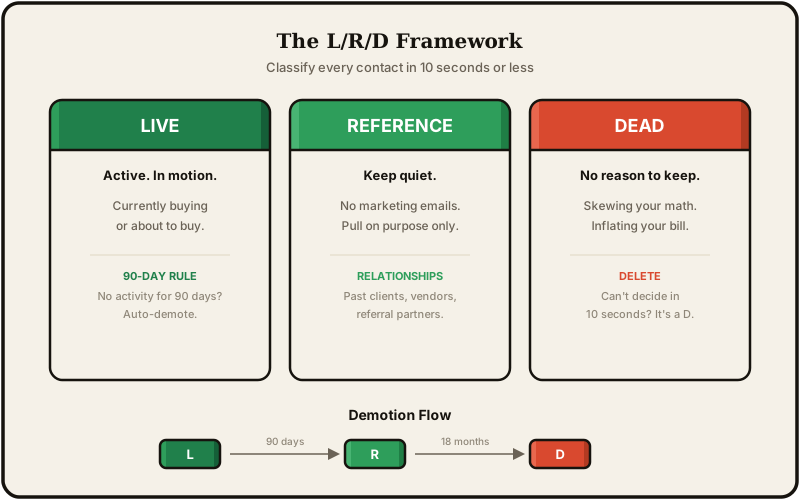
I didn't want to agonize over every contact. So I made a dead-simple framework. Three categories. Every record gets one.
Live - Active, in motion. Currently buying or about to buy. If a Live contact ghosts for 90 days, it falls out of Live automatically.
Reference - Not transacting, but there's a real reason to keep them. Past clients, vendors, referral partners. These people exist in your CRM but receive no marketing emails by default. They're not leads. They're relationships.
Dead - No transaction, no relationship, no specific reason to keep them. Taking up space, skewing your math, and inflating your bill.
I exported everything to a spreadsheet. Made one extra column. Put L, R, or D next to every name. 71% got D.
The rule I gave myself - if I can't decide in 10 seconds, it's a D. That single constraint made a 3-hour project out of what felt like it would take a week.
What to delete after a deal closes
This one trips people up. You close a deal and think everything from the sales process is precious. It's not.
You're not deleting the customer. You're deleting the gunk that got you there.
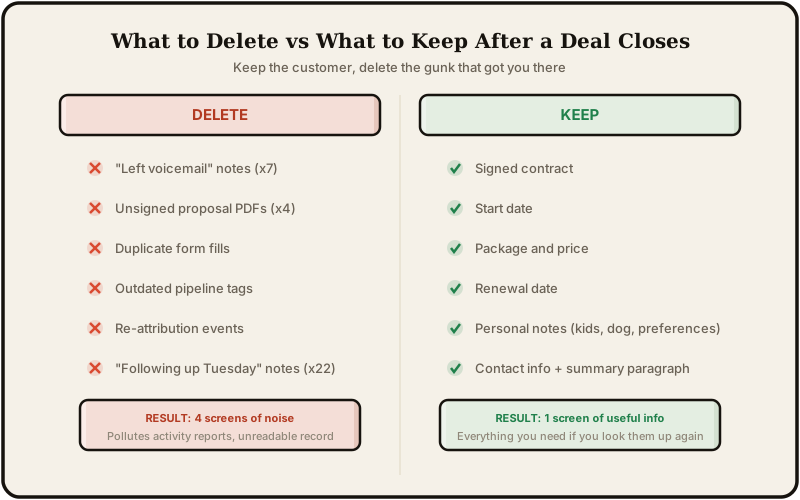
Delete these.
- 7 "left voicemail" activity notes
- 4 unsigned proposal PDFs from earlier revisions
- 22 internal notes that say things like "waiting on reply" and "following up Tuesday"
- Broken form fills from test submissions
- Outdated tags that no longer match your current pipeline stages
- Re-attribution events from when you changed UTM structures
All of that is noise. It makes the contact record unreadable and it pollutes your activity reporting.
What to keep forever
Keep the stuff that matters if you ever need to look this person up again.
- The signed contract
- Start date
- Package and price
- Renewal date
- Personal notes (kid's name, dog's name, hates phone calls)
- A single summary paragraph of what you did for them and how it went
That's it. One screen of useful information instead of four screens of voicemail logs.
Deduplication, the silent pipeline killer
Before I even started the L/R/D sort, I ran a duplicate check. Found 340 duplicate records in a database of roughly 4,800.
Duplicates are insidious because they don't look wrong at first glance. You have "Ben Lambourne" and "Benjamin Lambourne" as separate contacts. Both have activity. Both have notes. Neither one tells the full story. Your conversion metrics are wrong because the same person shows up as two separate leads. Your email sequences hit the same inbox twice. Your revenue attribution splits across two records instead of crediting one.
Most CRMs have a built-in deduplication tool that matches on email address. That catches the obvious ones. But name-based duplicates, company-based duplicates, and phone-number-based duplicates need a manual pass. I spent 30 minutes merging records before starting the full audit, and it made the rest of the cleanup significantly cleaner.
The merge rule I use - keep the record with more activity history. Copy any unique notes or tags from the duplicate into the surviving record. Delete the duplicate. Don't try to "combine" them into some Frankenstein hybrid. Pick a winner.
Data governance, the rules that prevent the next mess
Deleting 71% of my contacts felt great. But if I didn't change the habits that created the mess, I'd be right back here in two years.
So I wrote myself five data governance rules. Nothing fancy. Just standards I follow every time data enters my CRM.
-
Required fields at intake. Every new contact gets a source, a referrer (if applicable), and a lifecycle stage. No exceptions. If I don't have this information, I find it before creating the record.
-
One format for names. First name capitalized, last name capitalized. No "ben lambourne" or "BEN LAMBOURNE." My CRM auto-formats this now, but I had to configure it.
-
No orphaned records. Every contact belongs to at least one list, pipeline, or segment. If a contact doesn't fit anywhere, it probably shouldn't exist.
-
Email verification on import. Before I bulk-import anything, I run the list through an email verification service. Costs about $5 per thousand records. Saves me from tanking my sender reputation with bounces.
-
One owner per record. Every contact has a clear owner. In my case that's always me since I'm a solo operator. But for teams, unowned records are the ones that rot fastest.
These aren't revolutionary. They're just the things I wasn't doing before that let 14 years of garbage accumulate.
The rebrand that went sideways
A client decided to rebrand. New name, new identity, fresh start. Except nobody cleaned the CRM.
They imported 12,000 old contacts under the new brand name. Contacts who knew the old name started getting emails from a company they'd never heard of. Bounce rates shot up. Spam complaints spiked. Google started having an identity crisis about who this brand even was.
The result - worst leads they'd ever seen. Citation cleanup took months. All because someone hit "import all" instead of asking which of those 12,000 contacts actually belonged in the new world.
A rebrand is the perfect time for a data audit. It's also the worst time to skip one.
The 50 leads that vanished into nothing
Different client. Their contact form was generating 3-5 form fills a day like clockwork. Had been for months. Steady, predictable.
One day leads just stopped. Everything looked fine on the surface. Form submits, confirmation loads, no error messages. Just no notifications.
Turns out Microsoft pushed an Outlook update that silently rerouted form notification emails into nothing. Not the spam folder. Not a hidden tab. Literally nowhere. The emails ceased to exist.
By the time we caught it, there were 50 form fills submitted, stored in the database, never acted on. Fifty real people who asked for help and heard nothing back.
Clean data is not a vanity exercise. It's how you notice when the building is on fire. If your baseline numbers are already meaningless because of junk data, you can't spot when something actually breaks. You have no "normal" to compare against.
The reporting bonus
Here's what happened to my numbers after the Saturday audit.
Average deal size went up. Not because I closed bigger deals. Because I was no longer averaging across imaginary deals that never existed in the first place.
Conversion rate went up. Not because I got better at selling. Because I was no longer dividing by 8,000 fake leads that were never going to buy anything.
Sales cycle went down. Not because deals moved faster. Because I was no longer counting six-month gaps of nothing as "time in pipeline."
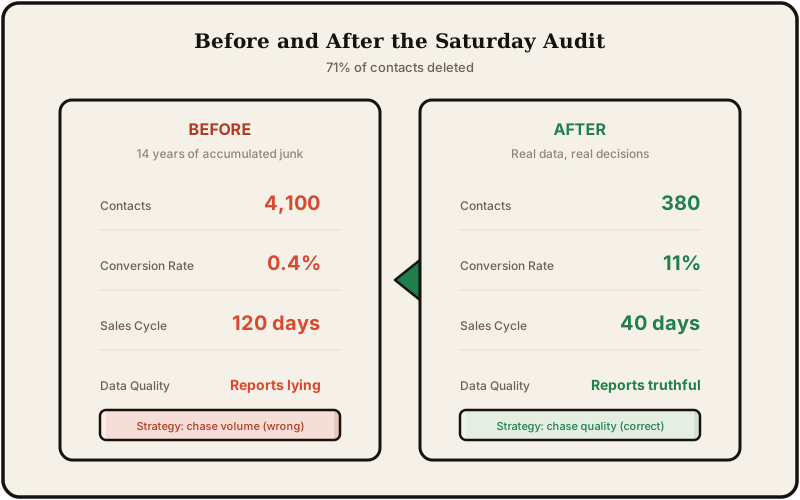
When your data says your conversion rate is 0.4%, you chase volume. You think you need more leads. When it says 11% on real leads, you chase quality. You focus on getting better leads instead of more leads. Those are completely different businesses with completely different strategies, and the only thing separating them is whether your data tells the truth.
The Saturday audit (how to do this)
Block 3-4 hours. Put on something you can listen to for a while. Here's the process.
-
Export everything to a spreadsheet. Every contact, every field. This is your working copy.
-
Add four columns. L, R, D, and "reason." The reason column is for the edge cases where you want to remember why you kept someone.
-
Force a decision on every row. Can't decide in 10 seconds? It's a D. Move on.
-
Archive a backup before you touch your CRM. Export the full database one more time and save it somewhere you won't accidentally delete. You will never open this file again but you'll sleep better knowing it exists.
-
Delete the Ds. Remove the Rs from all marketing automation sequences. For the Ls, write one sentence next to each about what happens next.
-
Build a decay rule. L sits 90 days with no activity? Demoted to R. R sits dormant 18 months? Reviewed and probably deleted. This keeps the audit alive instead of letting the junk pile back up.
That's it. One Saturday. You'll wonder why you waited so long.
The maintenance schedule that keeps it clean
A one-time audit solves the immediate problem. But data decays continuously, so you need ongoing CRM data hygiene habits. Here's what I do now.
Monthly (15 minutes)
- Run the built-in deduplication scan. Merge anything it catches.
- Check bounce rates from the last email send. Any hard bounces get removed immediately.
- Glance at the "no activity in 60 days" segment. Anything suspicious gets investigated.
Quarterly (1 hour)
- Review lifecycle stages. Contacts marked "Live" that haven't progressed in 90 days get demoted to Reference or deleted.
- Verify that enrichment data (company names, job titles) still matches reality for active deals.
- Archive closed-lost opportunities older than 6 months.
Annually (the Saturday audit again)
- Full L/R/D pass on everything.
- Reassess field structure. Kill any custom fields nobody has used in 12 months.
- Review data governance rules and update them if the business has changed.
The monthly check takes almost no time once your baseline is clean. The quarterly check keeps drift in control. The annual audit prevents another 71% situation from building up silently.
The point isn't perfection. It's preventing your CRM from becoming a data swamp again. Continuous maintenance beats periodic panic cleanups every time.
This is the real cost of bad data
Every month you pay for contacts that will never buy from you, you're not just wasting the subscription fee. You're making decisions based on numbers that aren't real. You're chasing volume strategies when quality strategies would work. You're missing actual problems because your baseline is already broken.
The CRM vendors won't tell you this because they make more money when you store more contacts. But the math works in the other direction.
If you're evaluating what your CRM actually costs you, I broke down the full 5-year math including the hidden lines. And if you're thinking about taking full ownership of your data instead of renting it, here are the real numbers from self-hosting.
Clean data also makes everything else in your CRM actually work. My referral tracking system only produces useful numbers because the underlying data is trustworthy. Garbage in, garbage out applies to every report you'll ever pull.
Delete the dead weight. Your reports will thank you.